Candidates, it’s the final weekend before all things start going 100 MPH. Here’s a few things for you to work on:

Website CONTACT INFO: Make sure you have the following on the bottom of your website or your contact page: A mailing address, in case people want to send you a donation check, a phone number (I highly recommend getting a Google Voice number, and an email address you can receive email from.) Don’t trust someone else to do it. Also a link to your Linktr.ee!
Set up Google Alerts here: google.com/alerts
Set them up for your name
Issues
Opponents names
Set up your Google Email Signatures:
No-Signature
Political Signature w/Google Voice Info and emails to team
Personal Signature - the one where you send someone your personal info that you will use rarely.
Run your website by Broken Link Checker: ahrefs.com/broken-link-checker
Set up your Canva branding. This means set up your logo, branding colors, graphical elements, and fonts. You can pick unique fonts and load them into your branding kit. You should have no more than two fonts that are part of your main branding kit.
Go here and look at the Into Action Lab Cultural Calendar. You can also, with a click of a button sync the cultural calendar to your calendar. Which I highly recommend you do.
Create Holiday Graphics that you can Pre-schedule. Write down all the Holidays you need to create graphics for:
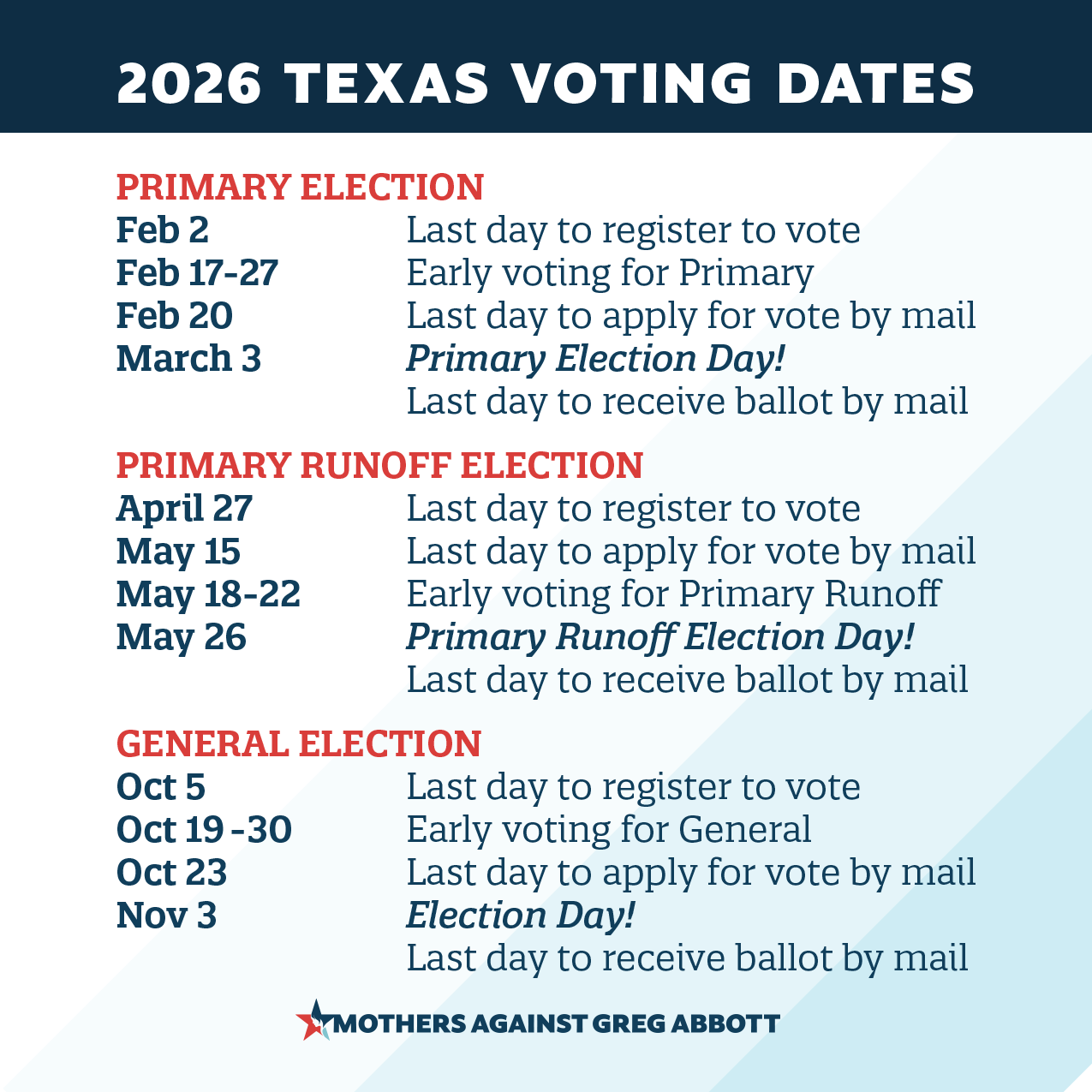
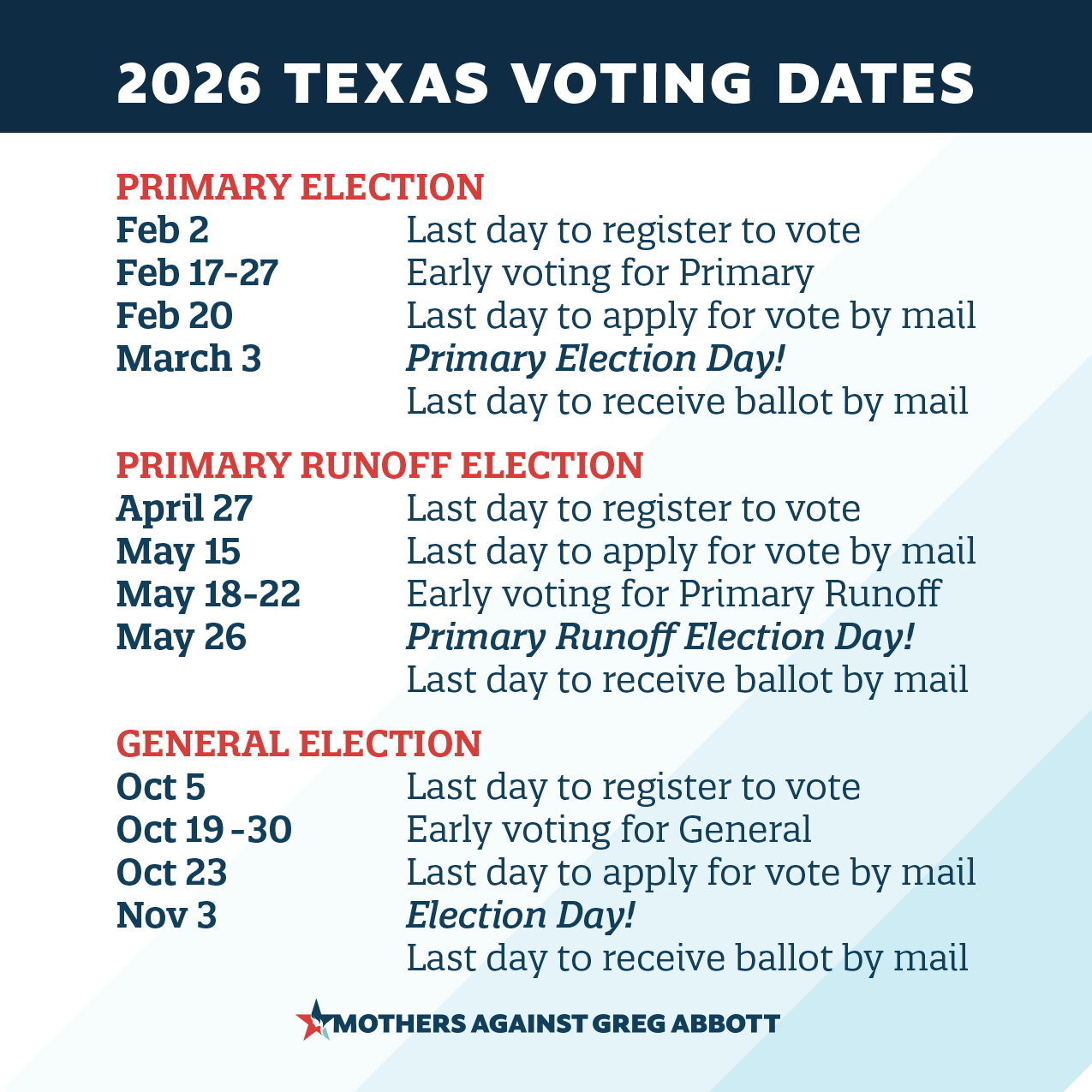
Make graphics for all the election dates. See my graphic below
Jan 6th
MLK Day
Anniversary of Roe v Wade
Chinese New Year - 2026 is the year of the Horse
Black History Month
World Wetlands Day
Valentine’s Day
President’s Day
International Women’s Day
St Patrick’s Day
Tax Day
Easter
Passover
Earth Day
AAPI Heritage Month
Teacher Appreciation
World Press Freedom
Mothers Day
Memorial Day
June Pride Month
Loving Day
Father’s Day
Juneteenth
4th of July
Labor Day
Hispanic Heritage Month
Indigenous Peoples Day
Halloween
Dia de Los Muertos
Veterans Day
Election Day (you can stop here if you only want to schedule through Election Day)
Thanksgiving Day
Sandy Hook
Christmas
Hanukkah
Kwanzah
New Years
Two Sizes of Holiday Graphics: You will need to create two types of files for your Holiday Graphics. You will need a size for Facebook/x and then a size for Instagram.
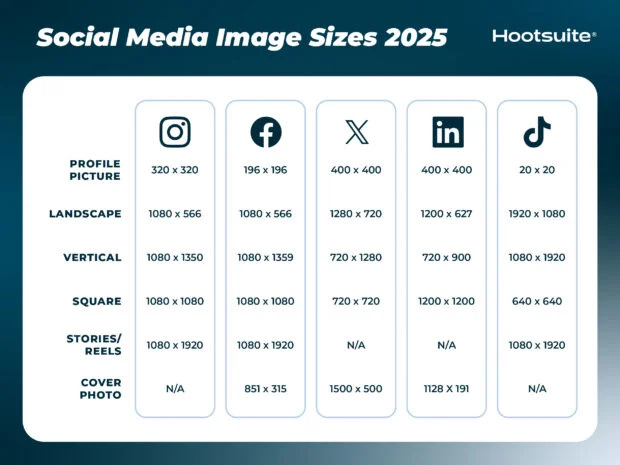
Facebook/X 1:1 Square. It will auto-resize for each platform except IG it looks better in a 4:5
Instagram 4:5 or 1080x 1350
I find it easier to great all the square ones first and then resize for Instagram next. I have a folder set up for Holiday Social Graphics.
Making these graphics should be fun and an easy thing to do
Social Media Scheduling App: After you finish them. You can start scheduling graphics on your social media scheduling app. I use Buffer, but people really like Publer as well. It’s an easy thing to do while you binge-watch a show and try to relax before things go insane.